¶ Corridor Real Time (ATM | Corridor Real Time)
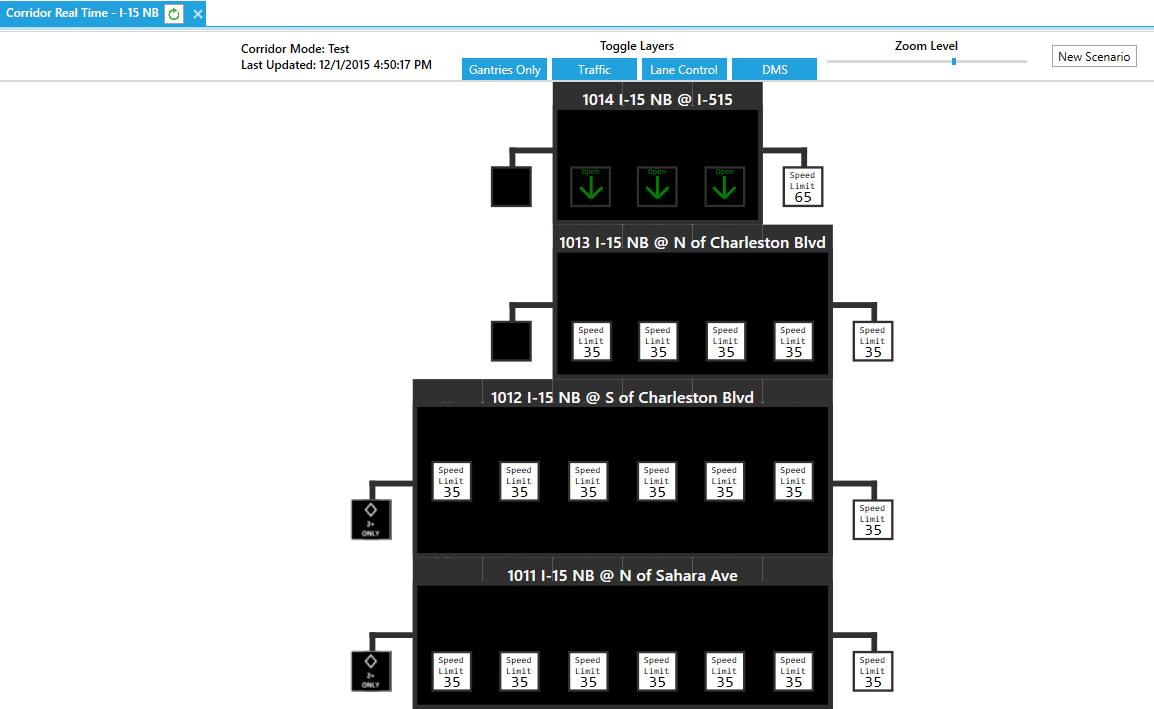
The Corridor Real Time form allows users to view real time status of corridors that are defined within the ATM System.

¶ Controls
The controls for the Real Time form are found at the top of the form.

| Field | Description |
| Gantries Only | Collapes/Expands the road segments for the gantries |
| Traffic | Toggles the display of the colored speeds for the road segments |
| Lane Control | Toggles the display of the lane controls on the gantries |
| DMS | Toggles the display of the left side DMS and the right side DMS |
| Zoom Level | Sets the zoom level of the corridor within the form |
| New Scenario | Used to define a new Manual Scenario |
¶ Real-Time Display
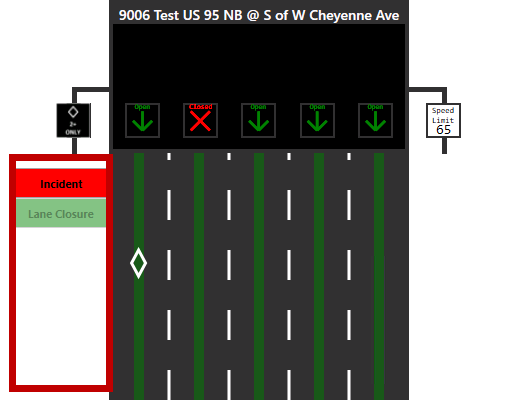
Immediately beneath the form controls is a graphical display of the selected corridor. Display boxes to the left of each gantry show any scenario and conditions that apply to the gantry. These system-generated descriptors are based on manual or automatic events. A collective list is included in the tables below.

| Scenario Reason | Description |
| Incident | An accident or other unanticipated traffic situation. |
| Event | A planned condition related to events such as sporting games, etc. |
| Roadwork | Lane closure or speed reduction related to roadwork. |
| Junction Control | Closure of a right-most lane to allow smoother merging of incoming traffic. |
| Planned Closure | A planned lane closure unrelated to roadwork or managing merging traffic. |
| Scenario | Description |
| Speed Harmonization | Reduced speeds are implemented because the average speed of lanes at a nearby gantry is below the speed harmonization threshold. |
| Free Flow | No active automatic or manual scenarios affect this gantry. |
| Full Closure | All lanes are closed. |
| Lane Closure | Lane control signs are displayed related to closure of one or more lanes. |
| Merge Display | A merge sign is displayed over a single lane due to reduced speeds in that lane. |
| HOV Speed Dif | The HOV speed limit is restricted below what its condition calls for, due to the current GP speed limit and differential limit. |
| Speed Sign Approach | The gantry has signs related to an upcoming reduced speed zone. |
| Speed Sign Zone | The gantry has a reduced speed limit. |
| Speed Sign End | The gantry resumes the maximum speed limit. |
| Variable Speed | Reduced speeds are implemented because two or more lanes at a nearby gantry have speeds below the queue warning threshold. |
| Detector Failure Threshold | The number or percent of failed detectors related to this gantry have reached the threshold value. |
| Complete Detector Failure | All detectors related to this gantry have failed. This may occur before reaching the detector failure threshold, for example if the threshold is a count of 3 failed detectors and the 2 detectors for a gantry both fail. |
¶ Top
¶ Manual Scenario
Manual scenarios can be added via selecting the New Scenario button from the controls or edited by selecting a manual scenario listed beside a gantry.
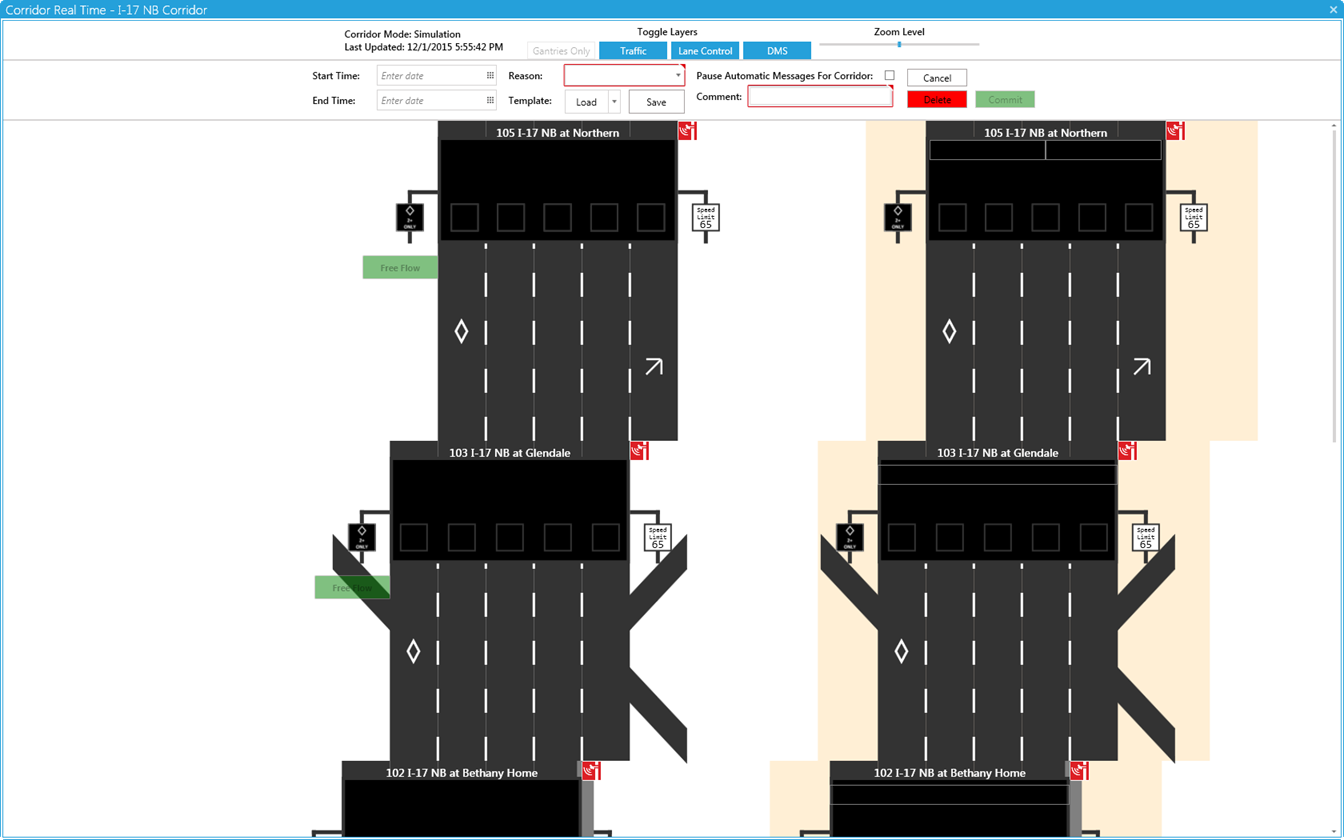

Once manual scenarios are defined they will be listed beside the gantries.
.png)
The manual scenario edit mode will show an edit mode on the right side of the Real Time form. Once the manual scenario edit mode is accessed, the following controls become available towards the top of the form.


| Field | Description |
| Start Time |
Sets the date/time that the scenario will begin.
Note: Leaving this field blank will start the scenario immediately. Future schedule scenarios with have an Alert prior to starting as defined by the corridor Minutes To Alert parameter |
| End Time |
Sets the date/time that the scenario will end.
Note: Leaving this field blank will leave the scenario running indefinitely. |
| Reason |
Set the type of reason for the manual scenario. The priority of the reasons are as follows: Incident - An accident or other unanticipated traffic situation. Event - A planned condition related to events such as sporting games, etc. Roadwork - Lane closure or speed reduction related to roadwork. Junction Control - Closure of a right-most lane to allow smoother merging of incoming traffic. Planned Closure - A planned lane closure unrelated to roadwork or managing merging traffic. |
| Template Load | Loads a previously saved template for a manual scenario such as an Amber/Silver Alert template |
| Template Save | Saves the current manual scenario configuration as a template that can be used again |
| Pause Automatic Messages For Corridor (Checkbox) | Enables/Disables automatic scenario overhead messages (if they are configured to occur) |
| Cancel | Cancels the creation of a new manual scenario. If editing an existing manual scenario, cancels any changes that were made. |
| Delete | Deletes the manual scenario. |
| Commit | Commits the creation of a new manual scenario. If editing an existing manual scenario, commits any changes that were made. |
The following is a list of Manual and Automatic scenarios.
| Scenario | Description |
| Speed Harmonization | Reduced speeds are implemented because the average speed of lanes at a nearby gantry is below the speed harmonization threshold. |
| Free Flow | No active automatic or manual scenarios affect this gantry. |
| Full Closure | All lanes are closed. |
| Lane Closure | Lane control signs are displayed related to closure of one or more lanes. |
| Merge Display | A merge sign is displayed over a single lane due to reduced speeds in that lane. |
| HOV Speed Dif | The HOV speed limit is restricted below what its condition calls for, due to the current GP speed limit and differential limit. |
| Speed Sign Approach | The gantry has signs related to an upcoming reduced speed zone. |
| Speed Sign Zone | The gantry has a reduced speed limit. |
| Speed Sign End | The gantry resumes the maximum speed limit. |
| Variable Speed | Reduced speeds are implemented because two or more lanes at a nearby gantry have speeds below the queue warning threshold. |
| Detector Failure Threshold | The number or percent of failed detectors related to this gantry have reached the threshold value. |
| Complete Detector Failure | All detectors related to this gantry have failed. This may occur before reaching the detector failure threshold, for example if the threshold is a count of 3 failed detectors and the 2 detectors for a gantry both fail. |
¶ DMS Library Messages (Per Reason)
After selecting a reason for the manual scenario, library messages for that category will become available. To add a message to a gantry, select and drag a library message to the desired gantry's overhead DMS.

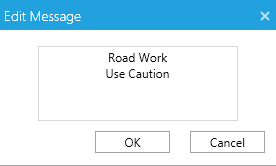
To create a new Library message click the New button and then type the message in the Edit Message popup that will appear. Click the OK button once the message is completed.
To edit an existing message select the message, click the Edit button and the edit the message within the Edit Message popup. Click the OK button once the message is completed.
¶ DMS Controls
A command for a lane control sign can be set by clicking within the desired Lane Control to expand the available options (Open, Closed, Speed, Blank).
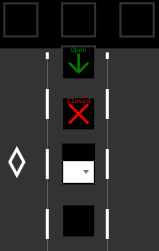
Speeds can be commanded to a Lane Control or side DMS based on the parameters that are defined for the corridor. To expand the Speed selection drop down first click on the desired DMS. Next, select the speed drop down to expand available speed. Finally select the desired speed.

¶ ATM Scenarios (ATM Real-Time)
The Corridor Real Time screen will show descriptions of the scenarios beside the affected gantry. These are system generated descriptors for each gantry based on manual or automatic events which impact it. Gantries with no impacting events will display "Free Flow".
| Scenario Reason | Description |
| Incident | An accident or other unanticipated traffic situation. |
| Event | A planned condition related to events such as sporting games, etc. |
| Roadwork | Lane closure or speed reduction related to roadwork. |
| Junction Control | Closure of a right-most lane to allow smoother merging of incoming traffic. |
| Planned Closure | A planned lane closure unrelated to roadwork or managing merging traffic. |
| Scenario | Description |
| Speed Harmonization | Reduced speeds are implemented because the average speed of lanes at a nearby gantry is below the speed harmonization threshold. |
| Free Flow | No active automatic or manual scenarios affect this gantry. |
| Full Closure | All lanes are closed. |
| Lane Closure | Lane control signs are displayed related to closure of one or more lanes. |
| Merge Display | A merge sign is displayed over a single lane due to reduced speeds in that lane. |
| HOV Speed Dif | The HOV speed limit is restricted below what its condition calls for, due to the current GP speed limit and differential limit. |
| Speed Sign Approach | The gantry has signs related to an upcoming reduced speed zone. |
| Speed Sign Zone | The gantry has a reduced speed limit. |
| Speed Sign End | The gantry resumes the maximum speed limit. |
| Variable Speed | Reduced speeds are implemented because two or more lanes at a nearby gantry have speeds below the queue warning threshold. |
| Detector Failure Threshold | The number or percent of failed detectors related to this gantry have reached the threshold value. |
| Complete Detector Failure | All detectors related to this gantry have failed. This may occur before reaching the detector failure threshold, for example if the threshold is a count of 3 failed detectors and the 2 detectors for a gantry both fail. |