¶ Detector Stations (Database | Detector Stations | Stations)
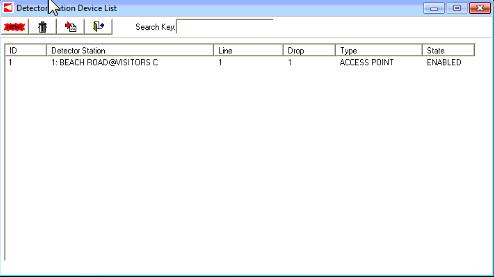
The Detector Stations are displayed in the Detector Station Device List form. The user defined parameters of intersection description, line and drop numbers, detector type, and detector state are shown.

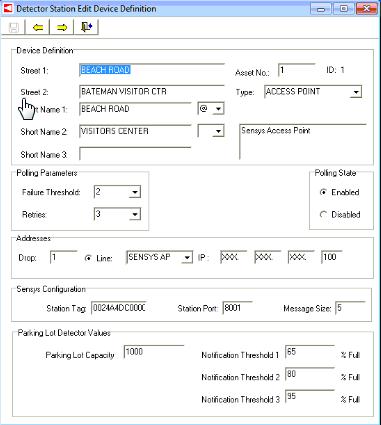
The user is able to define new devices as well as edit previously defined devices in the Edit Device Definition form.

¶ McCain Ramp Meters
- Users can configure the system to poll McCain Ramp Meters using AB3418 for Detector Station data.
- In this instance, the user should select the correct Type, and Addresses parameters.
¶ Sensys Detector Station Configuration
- Set the Type to Access Point
- Determine the Station Tag, Station Port, and Message Size from the Sensys Access Point that will be communicated with. The Station Tag is the configured name in the Access Point setup from Sensys. Typically, the Station Port is 8001 and the Message Size is 5.
¶ Parking Lot Detection
- In order for KITS to trigger parking lot events the Parking Lot Detector Values parameters need to be set. Additionally, the user must configure the entrance and exit Detector Stations Detectors.
- Parking Lot Capacity - this value will be used during the daily volume calculation for parking lot full events.
- Notification Threshold - these values determine when the system will trigger events for a parking lot system.
Percent full is calculated as follows: (Today's Entrance Detector Volume - Today's Exit Detector Volume) / Parking Lot Capacity
¶ Ramp Meters (System Detection | Definition | Ramp Meters) (Map | Add Device | Ramp Meter)
The Ramp Meter form allows the user to add a new Ramp Meter and edit existing Ramp Meters.
¶ Accessing Form
The Ramp Meter wizard can be accessed from the System Detection ribbon tab.
- System Detection Tab -> Definitions -> Ramp Meters -> New/Edit Ramp Meter

¶ Defining Ramp Meter Location
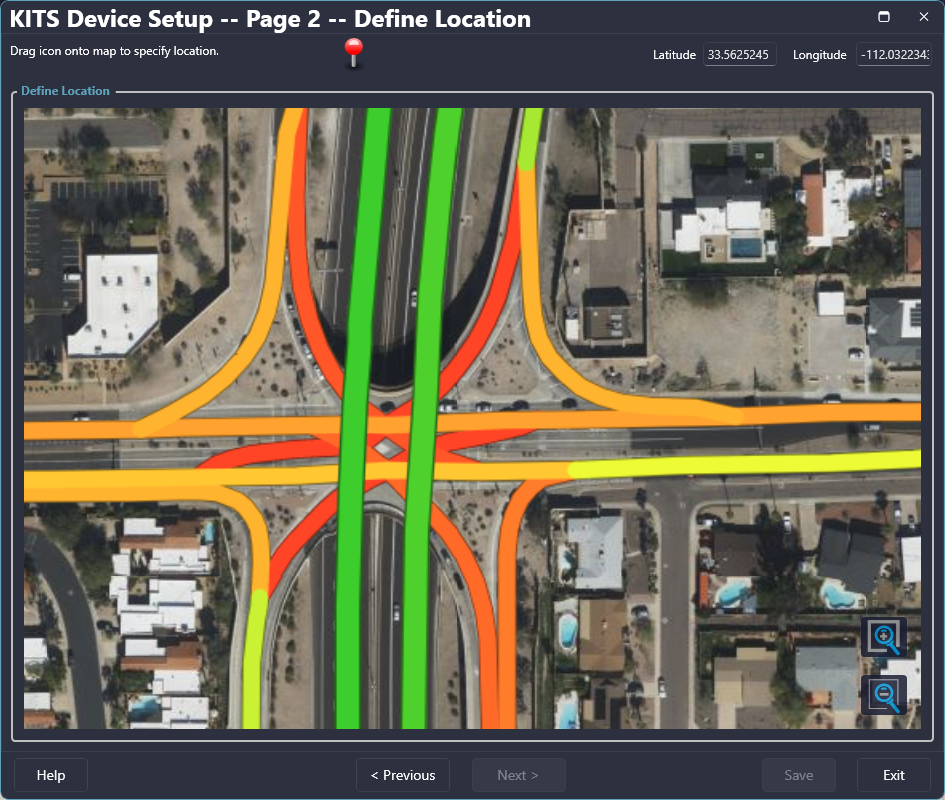
When adding a new device, the location can be set or edited from the 'Define Location' page of the wizard. If it is a new device and a pin has not been placed, click and drag the pin at the top of the form to the desired location. If a pin has already been dropped, it can be relocated by clicking on it and dragging it to the desired location.

| Field | Description |
| Zoom In | Zooms the map in towards the center of the map view |
| Zoom Out | Zooms the map out |
| Latitude | Latitude of the pin's location |
| Longitude | Longitude of the pin's location |
| Help | Opens the help file |
| Cancel | Cancels the gantry changes/creation |
| Previous | Goes to the previous page of the New Device Wizard (Page 1 is only accessible when Add New Device is used to open the wizard) |
¶ Configuring Ramp Meter Parameters
After the pin has been placed, the parameter definition section of the Wizard becomes available. Required attributes are outline in red. After completing the definition entry, the Save button will be enabled allowing the user to finalize the device and close the Wizard. If Previous or Exit is selected before saving, any data entered will be lost.
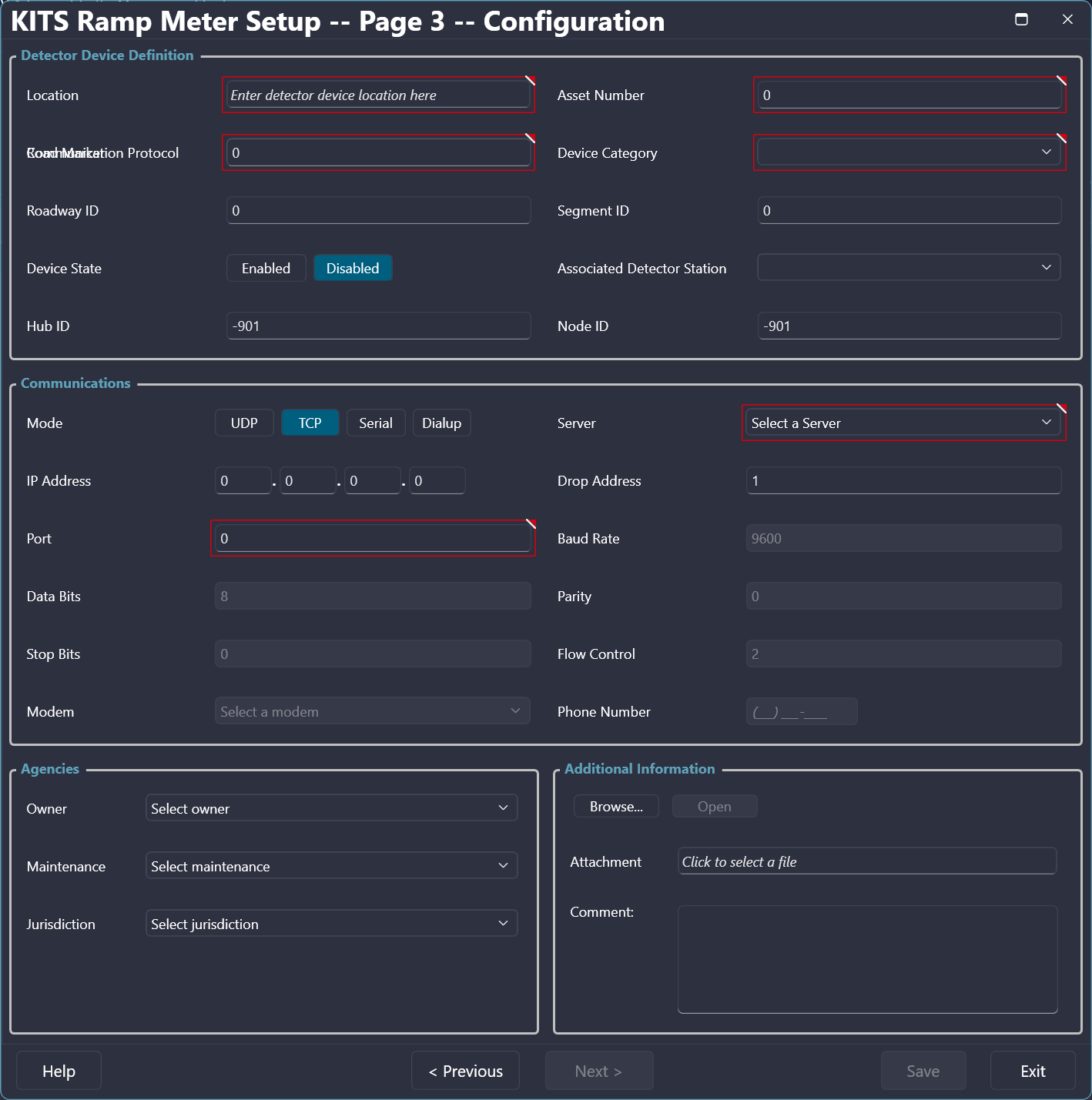

The Ramp Meter definition form allows configuration of the following parameters.
| Field | Description |
| Location* | Definition of the device location |
| Asset Number* | Sets the Asset Number of the device for identification |
| Communication Protocol* | Sets the particular protocol used by the device for communications |
| Device Category* | Unique value related to the device manufacturer |
| Road Marker | Set the mile marker for the device location |
| Roadway ID | Sets the roadway references ID for the device |
| Device State | Sets the polling state to enabled (on) or disabled (off) |
| Associated Detector Station | Sets the detector station linked with the selected ramp meter |
| Hub ID | Used for server communication to the device |
| Node ID | Used for server communication to the device |
| Mode | Sets the mode that is used for communication (IP, Serial, Dial-up); IP requires a line (can be created with auto feature); Serial requires a Line creation and Baud Rate definition; Dial-up requires a Line creation, Phone Number, and Baud Rate definition |
| Server | Set the server communicating with the device |
| IP Address | Defines the IP Address of the device |
| Drop Address | Sets the drop address (defaulted to 1) |
| Port* | Sets the port number for communication |
| Baud Rate | Sets the Baud Rate for communication (defaulted to 9600 for IP) |
| Data Bits | Used for server communication to the device |
| Parity | Used for server communication to the device |
| Stop Bits | Used for server communication to the device |
| Flow Control | Used for server communication to the device |
| Modem | Sets the modem, when communications mode is Dial-up |
| Phone Number | Sets the phone number for Dial-up communication |
| Owner | Sets the owner of the device |
| Maintenance | Sets the agency responsible for the maintenance of the device |
| Jurisdiction | Sets the jurisdiction the device falls into |
| Attachment | Allows attachment of one file of the following file formats: .xlsx, .xls, .xml, .txt |
| * Minimum required attributes for the device to successfully be created. | |
¶ Detector Station Lines (Database | Detector Stations | Lines)
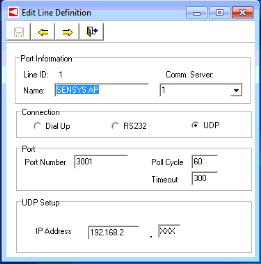
The Detector Station Lines are displayed in the Detector Station Line List form. The user defined parameters of line name, connection type, IP address, and server ID are shown.
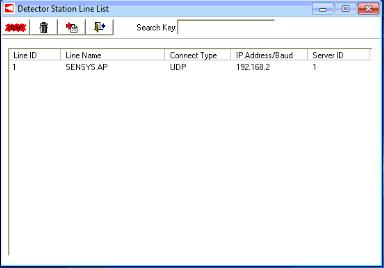

The user is able to define new lines as well as edit previously defined lines in the Edit Line Definition form.
¶ Detector Station Detectors (Database | Detector Stations | Detectors)
The Detector Station Detectors are displayed in the Detector Station Detector List form. The user defined parameters of intersection description, detector name, and detector type are shown.
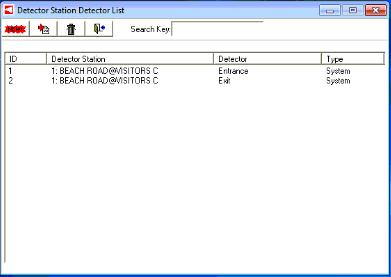

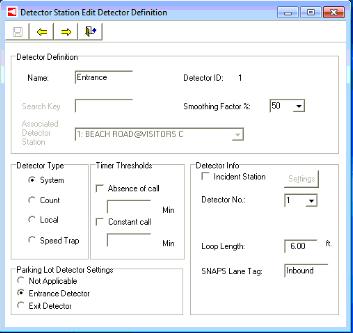
The user is able to define new detectors as well as edit previously defined detectors in the Edit Detector Definition form.

¶ Traditional Loop Detectors
- Typically the user will want to configure detectors for a traditional Detector Station, like a McCain Ramp Meter. In this case, the user should configure the detector as a System Detector and configure the appropriate loop length for KITS to log the data properly.
¶ Sensys Detectors
- Set the SNAPS Lane Tag if you are using Sensys Detector Station types for your system. The Lane Tag is a configuration parameter for the Sensys Detector.
¶ Parking Lot Detectors
- The Parking Lot Detector Settings should be set to 'Not Applicable' for all non parking lot detection applications. For parking lot detection, the user must setup entrance and exit detectors in order for KITS to calculate for threshold events.
